Instagram Audio Downloader
Paste a public Instagram link to preview the audio and save it as MP3.
Sample audio
Check your rights before reposting, publishing an edit, or using the audio commercially. Copyright help
From link to MP3
Three steps from the post to a file you can play or save.
-
Copy the link
Open the Reel in the Instagram app. Tap the paper-plane Share icon on the right, then tap the chain icon labeled Copy link in the bottom row.
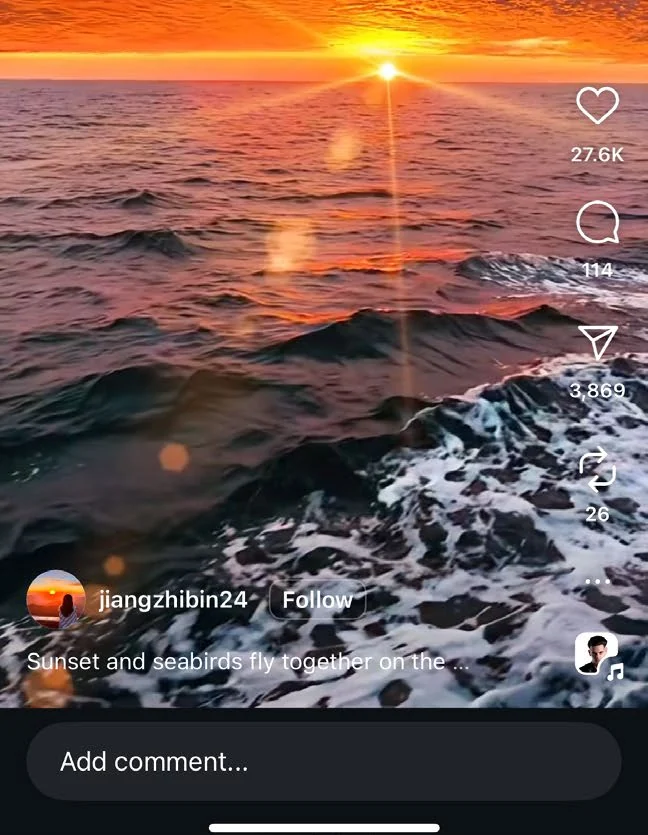
Tap Share 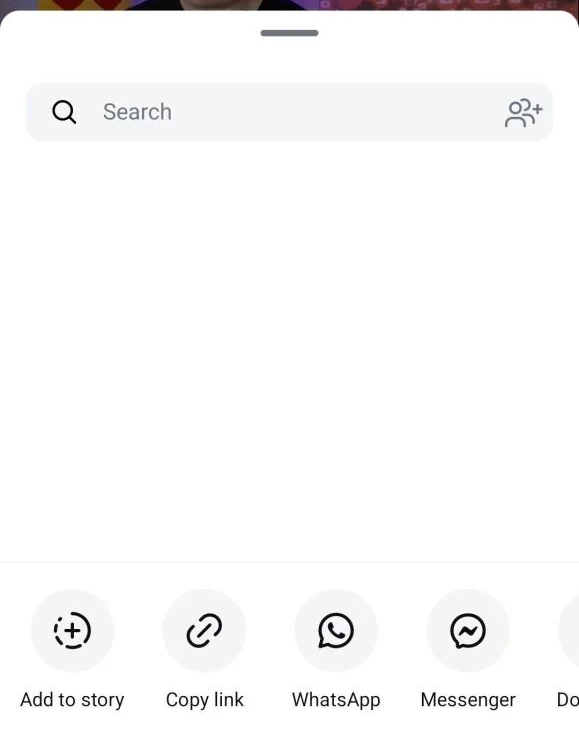
Tap Copy link iPhone Reel and Android sharing menu. If you don’t see Copy link, swipe across the bottom row. Screenshots from Meta and The Marketing Crowd.
-
Download the audio
Paste the URL into the Instagram link field above, then select Download audio.
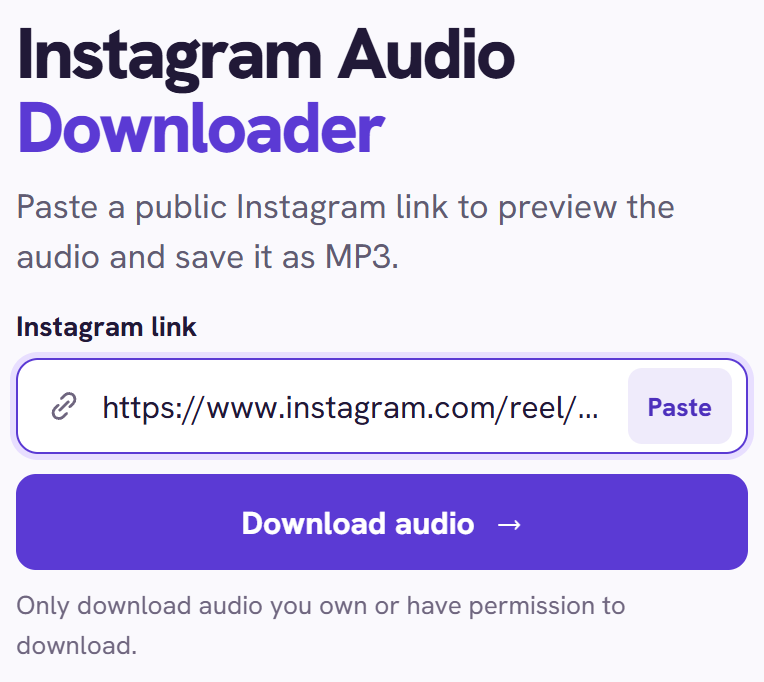
Paste the link above Download audio -
Listen and save
When the result appears, tap Play to check the sound, then select Download MP3.
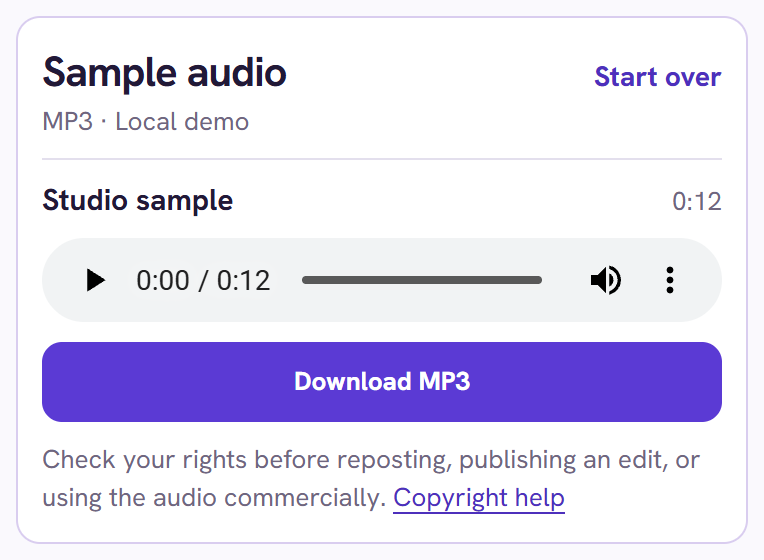
Audio result shown with the local demo
Which links can I paste?
The launch list will reflect testing. Start with a public link copied directly from Instagram.
Reels & video posts
Get the audio that plays in a public Reel or video post. This may include speech, music, and sound effects mixed together.
Carousel posts
When a post contains several videos, select the clips with audio. Photos can appear alongside those clips.
Stories & Highlights
Stories can expire. Highlights can contain several clips. Both are being checked before launch.
Audio pages & share links
An audio page points to a sound used by Reels. A share link opens a particular post. These links and older IGTV links are being checked before launch.
Good to know
Find your saved file, fix a link, or check how you can use a clip.
How do I download audio from an Instagram Reel?
In Instagram, open the Reel and select Share, then Copy link. Paste it into the Instagram link field above and select Download audio. Listen to the result, then select Download MP3 to save it. You can try the flow with the local sample.
Can I download audio from a private account?
The downloader is designed for public links. If the post is private, use a public clip you have permission to download.
Why couldn’t the tool open my link?
Open the original link in Instagram. If the post is gone, the Story has expired, or the account is private, try another public post you have permission to download. If the post still opens, copy the link again from its Share menu and paste the full URL.
Why is there no audio?
Check that the source video plays with sound. A photo or a silent clip won’t produce an audio file. For a carousel, try one of its video clips.
What audio goes into the MP3?
For a video, the MP3 contains the clip’s playable sound, including any voices, effects, and music mixed into it. An independent sound page points to the referenced track, which may differ from what you hear in a particular Reel.
Where do downloads go on iPhone and Android?
iPhone. In Safari, tap the Downloads button next to the address field. You can also open Files, then Browse, and look for Downloads. Check iCloud Drive if the folder doesn’t appear.
Android. In Chrome, open the three-dot menu and tap Downloads. You can also look in the Downloads section of your Files app.
Can I reuse the audio in my own video?
Check that your permission or license covers the intended use. A Reel you recorded can still contain a song owned by someone else. Before publishing an edit or using it in an ad, check the rights to every part of the audio. Read about copyright and reporting.
Is this free and do I need to sign in?
The planned downloader is free and requires no Instagram login. The current design preview runs locally with original demo audio.